
E-invoicing has now become an essential part of GST compliance in India. If your business falls under the prescribed turnover limit for e-invoice, generating invoices without an IRN (Invoice Reference Number) is not legally valid for B2B transactions.If you are using Tally, the good news is that you can generate e-invoices directly from the software once the setup is properly completed.
In this guide, I’ll explain:
- How to enable e-invoicing in Tally
- How to configure portal integration
- How to generate IRN
- Important compliance points to keep in mind
- Common errors and how to resolve them
This article is especially useful for accountants, tax professionals, and business owners managing GST compliance.
1. When is E-Invoicing Mandatory?
E-invoicing is mandatory for businesses whose aggregate turnover exceeds the limit notified by the government (based on previous financial years).
If your turnover crosses the prescribed threshold, you must generate e-invoices for B2B transactions. Without IRN generation through the Invoice Registration Portal, the invoice is considered invalid under GST law.
2. Enabling E-Invoicing in Tally
If you are using TallyPrime or Tally.ERP 9, first ensure that you are working on the latest release version that supports e-invoicing.
Step 1: Verify GST Details in Company Settings
- Go to F11 (Features)
- Enable GST
- Enter correct GSTIN
- Verify state, registration type, and address details
Accurate master data is extremely important because most errors occur due to incorrect GST or address details.

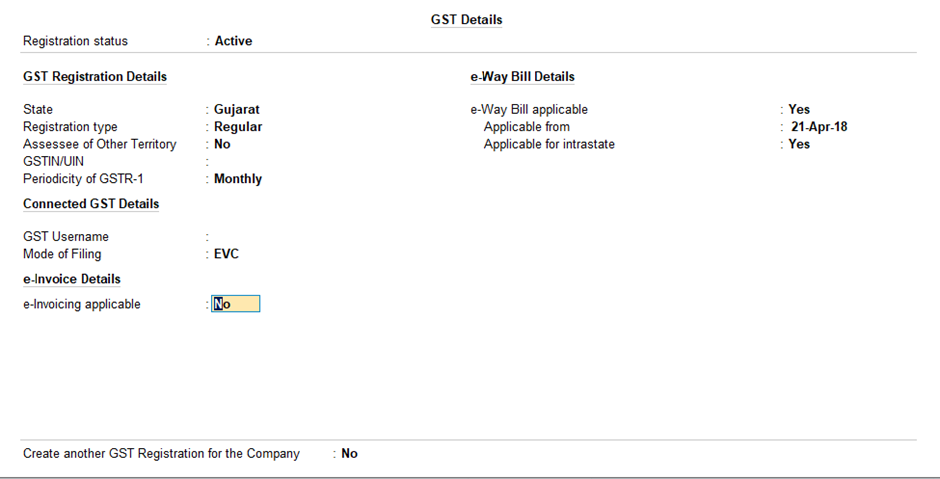
Step 2:- Enable E-Invoice Option
- Go to Gateway of Tally
- Press F11 → Statutory & Taxation
- Set “Enable E-Invoicing” to Yes
Once enabled, the system will allow you to configure portal credentials.
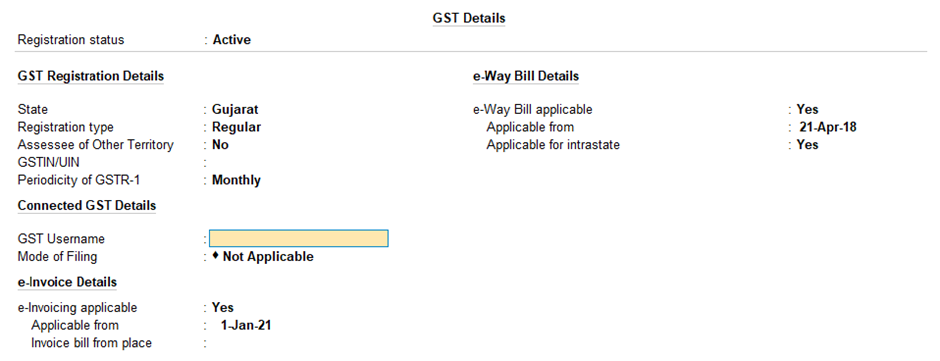
Step 3: Configure E-Invoice Portal Credentials
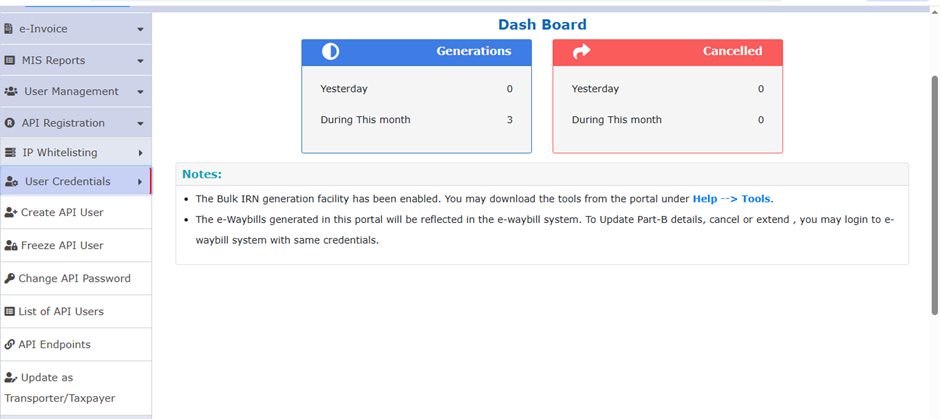
To generate IRN directly from Tally, you must register on the Invoice Registration Portal (IRP).
On the portal, you need to:
- Log in using your GSTIN
- Register for API access
- Generate API Username and Password
These credentials must be entered in Tally under e-invoice configuration settings. Without this integration, direct IRN generation will not work.
3. How to Generate E-Invoice from Tally
Once setup is completed, generating an e-invoice becomes a simple process.
Step-by-Step Process:
- Create a Sales Voucher for a B2B party
- Ensure the following details are correct:
- Party GSTIN
- HSN code
- Tax rate
- Place of supply
- Invoice number and date
- While saving the voucher, select the option to generate e-invoice.
If all details are valid:
- IRN will be generated
- Acknowledgment number will be received
- QR code will be auto-attached to the invoice
You can print the invoice along with the QR code directly from Tally.
4. Common Errors and Their Solutions
In practical experience, these are the most common issues:
❌ Invalid HSN Code
✔ Check item master and update correct HSN.
❌ GSTIN Mismatch
✔ Verify party ledger GSTIN carefully.
❌ State and Pincode Mismatch
✔ Ensure the state code matches the GSTIN and address details.
❌ Duplicate IRN
✔ Do not reuse the same invoice number for the same financial year.
Most errors are data-entry related, so keeping masters accurate is very important.
5. Important Compliance Points
- IRN must be generated before dispatch of goods.
- E-invoice data and e-way bill details should match.
- Maintain proper invoice number series.
- Avoid altering invoices after IRN generation.
Non-compliance may lead to penalties and rejection during assessment or audit.
6. Practical Advice for Accountants
If you are handling multiple clients:
- Review turnover regularly to check e-invoice applicability.
- Update Tally to the latest version.
- Maintain correct master data (GSTIN, HSN, tax rates).
- Keep API credentials secure.
Direct integration through Tally reduces manual errors and saves significant time compared to uploading invoices manually on the portal.
Conclusion
- E-invoicing through Tally simplifies GST compliance when configured correctly.
- Clean data and proper integration reduce errors and processing delays.
- Consistent monitoring ensures smooth IRN generation and audit readiness.
LinkedIn Link : RMPS Profile
Prepared by : Jaya Vadhwani
This article is only a knowledge-sharing initiative and is based on the Relevant Provisions as applicable and as per the information existing at the time of the preparation. In no event, RMPS & Co. or the Author or any other persons be liable for any direct and indirect result from this Article or any inadvertent omission of the provisions, update, etc if any.


Published on: February 25, 2026